Spring Data提供其他项目,用来帮助我们使用各种各样的NoSQL技术,包括MongoDB, Neo4J, Elasticsearch, Solr, Redis, Gemfire, Couchbase, Cassandra 和LDAP。
Spring Boot为Redis, MongoDB, Neo4j, Elasticsearch, Solr, Cassandra, Couchbase 和LDAP提供自动配置。也可以充分利用其他项目,但需要自己配置它们,具体查看projects.spring.io/spring-data中相应的参考文档。
Redis
Redis是一个缓存,消息中间件及具有丰富特性的键值存储系统。Spring Boot为Jedis客户端library提供基本的自动配置,Spring Data Redis提供了在它之上的抽象, spring-boot-starter-redis ‘Starter’收集了需要的依赖。
连接Redis
可以注入一个自动配置的 RedisConnectionFactory , StringRedisTemplate 或普通的 RedisTemplate 实例,或任何其他Spring Bean只要你愿意。默认情况下,这个实例将尝试使用 localhost:6379 连接Redis服务器:
@Component
public class MyBean {

    private StringRedisTemplate template;

    @Autowired
    public MyBean(StringRedisTemplate template) {
        this.template = template;
    }

    // ...

}
如果添加一个自己的,或任何自动配置类型的 @Bean ,它将替换默认实例(除了 RedisTemplate 的情况,它是根据 bean 的name ‘redisTemplate’而不是类型进行排除的)。如果在classpath路径下存在 commons-pool2 ,默认你会获得一个连接池工厂。
MongoDB
连接MongoDB数据库
可以注入一个自动配置的 org.springframework.data.mongodb.MongoDbFactory 来访问Mongo数据库。默认情况下,该实例将尝试使用URL mongodb://localhost/test 连接到MongoDB服务器:
import org.springframework.data.mongodb.MongoDbFactory;
import com.mongodb.DB;

@Component
public class MyBean {

    private final MongoDbFactory mongo;

    @Autowired
    public MyBean(MongoDbFactory mongo) {
        this.mongo = mongo;
    }

    // ...

    public void example() {
        DB db = mongo.getDb();
        // ...
    }

}
可以设置 spring.data.mongodb.uri 来改变该url,并配置其他的设置,比如副本集:
spring.data.mongodb.uri=mongodb://user:secret@mongo1.example.com:12345,mongo2.example.com:23456/test另外,跟正在使用的Mongo 2.x一样,可以指定 host / port ,比如,在 application.properties 中添加以下配置:
spring.data.mongodb.host=mongoserver
spring.data.mongodb.port=27017
Mongo 3.0 Java驱动不支持
spring.data.mongodb.host和spring.data.mongodb.port,对于这种情况,spring.data.mongodb.uri需要提供全部的配置信息。
如果没有指定
spring.data.mongodb.port,默认使用27017,上述示例中可以删除这行配置。
如果不使用Spring Data Mongo,可以注入
com.mongodb.Mongobeans 以代替MongoDbFactory。
如果想完全控制MongoDB连接的建立过程,可以声明自己的 MongoDbFactory 或 Mongo bean。
MongoDBTemplate
Spring Data Mongo提供了一个MongoTemplate类,它的设计和Spring的 JdbcTemplate 很相似。跟 JdbcTemplate 一样,Spring Boot会自动配置一个bean,只需简单的注入即可:
import org.springframework.beans.factory.annotation.Autowired;
import org.springframework.data.mongodb.core.MongoTemplate;
import org.springframework.stereotype.Component;

@Component
public class MyBean {

    private final MongoTemplate mongoTemplate;

    @Autowired
    public MyBean(MongoTemplate mongoTemplate) {
        this.mongoTemplate = mongoTemplate;
    }

    // ...

}
具体参考 MongoOperations Javadoc。
Spring Data MongoDB仓库
Spring Data包含的仓库也支持MongoDB,正如前面讨论的JPA仓库,基于方法名自动创建查询是基本的原则。
实际上,不管是Spring Data JPA还是Spring Data MongoDB都共享相同的基础设施。所以可以使用上面的JPA示例,并假设那个 City 现在是一个Mongo数据类而不是JPA @Entity ,它将以同样的方式工作:
package com.example.myapp.domain;

import org.springframework.data.domain.*;
import org.springframework.data.repository.*;

public interface CityRepository extends Repository<City, Long> {

    Page<City> findAll(Pageable pageable);

    City findByNameAndCountryAllIgnoringCase(String name, String country);

}
想详细了解Spring Data MongoDB,包括它丰富的对象映射技术,可以查看它的参考文档。
内嵌的Mongo
Spring Boot为内嵌Mongo提供自动配置,需要添加 de.flapdoodle.embed:de.flapdoodle.embed.mongo 依赖才能使用它。spring.data.mongodb.port 属性可用来配置Mongo监听的端口,将该属性值设为0,表示使用一个随机分配的可用端口。通过 MongoAutoConfiguration 创建的 MongoClient 将自动配置为使用随机分配的端口。如果classpath下存在SLF4J依赖,Mongo产生的输出将自动路由到一个名为 org.springframework.boot.autoconfigure.mongo.embedded.EmbeddedMongo 的logger。想要完全控制Mongo实例的配置和日志路由,可以声明自己的 IMongodConfig 和 IRuntimeConfig beans。
实验
本实验基于内嵌MongoDB数据库进行。
创建一个Maven项目
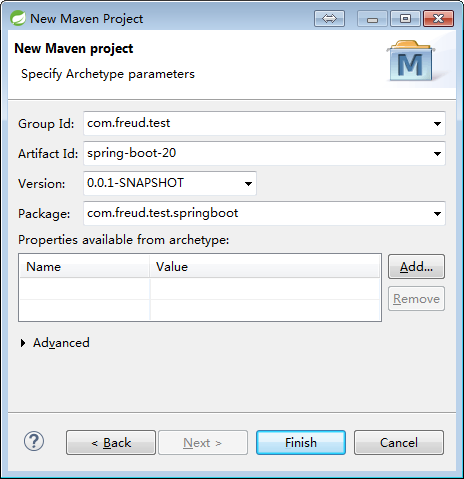
pom.xml
<project xmlns="http://maven.apache.org/POM/4.0.0" xmlns:xsi="http://www.w3.org/2001/XMLSchema-instance"
    xsi:schemaLocation="http://maven.apache.org/POM/4.0.0 http://maven.apache.org/xsd/maven-4.0.0.xsd">
    <modelVersion>4.0.0</modelVersion>

    <groupId>com.freud.test</groupId>
    <artifactId>spring-boot-20</artifactId>
    <version>0.0.1-SNAPSHOT</version>
    <packaging>jar</packaging>

    <name>spring-boot-20</name>
    <url>http://maven.apache.org</url>

    <properties>
        <project.build.sourceEncoding>UTF-8</project.build.sourceEncoding>
    </properties>

    <dependencies>
        <dependency>
            <groupId>org.springframework.boot</groupId>
            <artifactId>spring-boot-starter-web</artifactId>
        </dependency>
        <dependency>
            <groupId>org.springframework.boot</groupId>
            <artifactId>spring-boot-starter-data-mongodb</artifactId>
        </dependency>
        <!-- 内嵌MongoDB -->
        <dependency>
            <groupId>de.flapdoodle.embed</groupId>
            <artifactId>de.flapdoodle.embed.mongo</artifactId>
        </dependency>
    </dependencies>

    <build>
        <plugins>
            <plugin>
                <groupId>org.springframework.boot</groupId>
                <artifactId>spring-boot-maven-plugin</artifactId>
            </plugin>
        </plugins>
    </build>

    <dependencyManagement>
        <dependencies>
            <dependency>
                <groupId>org.springframework.boot</groupId>
                <artifactId>spring-boot-dependencies</artifactId>
                <version>1.5.4.RELEASE</version>
                <type>pom</type>
                <scope>import</scope>
            </dependency>
        </dependencies>
    </dependencyManagement>
</project>
application.yml
spring:
  application:
    name: test-20
  data:
    mongodb:
      port: 9999
server:
  port: 9090
City.java
package com.freud.test.springboot.bean;

import org.springframework.data.annotation.Id;

/**
 * @author Freud
 */
public class City {

    @Id
    private long id;
    private String name;

    public long getId() {
        return id;
    }

    public void setId(long id) {
        this.id = id;
    }

    public String getName() {
        return name;
    }

    public void setName(String name) {
        this.name = name;
    }

}
Country.java
package com.freud.test.springboot.bean;

import org.springframework.data.annotation.Id;

/**
 * @author Freud
 */
public class Country {

    @Id
    private long id;
    private String name;

    public long getId() {
        return id;
    }

    public void setId(long id) {
        this.id = id;
    }

    public String getName() {
        return name;
    }

    public void setName(String name) {
        this.name = name;
    }

}
CityController.java
package com.freud.test.springboot.controller;

import java.util.List;

import org.springframework.beans.factory.annotation.Autowired;
import org.springframework.data.mongodb.core.MongoTemplate;
import org.springframework.web.bind.annotation.GetMapping;
import org.springframework.web.bind.annotation.RequestMapping;
import org.springframework.web.bind.annotation.RestController;

import com.freud.test.springboot.App;
import com.freud.test.springboot.bean.City;

/**
 * 使用MongoTemplate来进行相关操作
 *
 * @author Freud
 */
@RestController
@RequestMapping("/city")
public class CityController {

    @Autowired
    private MongoTemplate mongoTemplate;

    @GetMapping("/all")
    public List<City> all() {
        return mongoTemplate.findAll(City.class);
    }

    @GetMapping("/find")
    public City find(Long id) {
        return mongoTemplate.findById(id, City.class);
    }

    @GetMapping("/save")
    public String save(City city) {
        try {
            mongoTemplate.save(city);
            return App.RESULT_SUCCESS;
        } catch (Exception e) {
            e.printStackTrace();
            return App.RESULT_FAILED;
        }
    }

    @GetMapping("/delete")
    public String delete(long id) {
        try {
            mongoTemplate.remove(id);
            return App.RESULT_SUCCESS;
        } catch (Exception e) {
            e.printStackTrace();
            return App.RESULT_FAILED;
        }
    }
}
CountryController.java
package com.freud.test.springboot.controller;

import java.util.List;

import org.springframework.beans.factory.annotation.Autowired;
import org.springframework.web.bind.annotation.GetMapping;
import org.springframework.web.bind.annotation.RequestMapping;
import org.springframework.web.bind.annotation.RestController;

import com.freud.test.springboot.App;
import com.freud.test.springboot.bean.Country;
import com.freud.test.springboot.repository.CountryRepository;

/**
 * 使用MongoRepository来进行相关操作
 *
 * @author Freud
 */
@RestController
@RequestMapping("/country")
public class CountryController {

    @Autowired
    private CountryRepository countryRepository;

    @GetMapping("/all")
    public List<Country> all() {
        return countryRepository.findAll();
    }

    @GetMapping("/find")
    public Country find(Long id) {
        return countryRepository.findOne(id);
    }

    @GetMapping("/save")
    public String save(Country country) {
        try {
            countryRepository.save(country);
            return App.RESULT_SUCCESS;
        } catch (Exception e) {
            e.printStackTrace();
            return App.RESULT_FAILED;
        }
    }

    @GetMapping("/delete")
    public String delete(long id) {
        try {
            countryRepository.delete(id);
            return App.RESULT_SUCCESS;
        } catch (Exception e) {
            e.printStackTrace();
            return App.RESULT_FAILED;
        }
    }
}
CountryRepository.java
package com.freud.test.springboot.repository;

import org.springframework.data.mongodb.repository.MongoRepository;

import com.freud.test.springboot.bean.Country;

/**
 * @author Freud
 */
public interface CountryRepository extends MongoRepository<Country, Long> {

}
App.java
package com.freud.test.springboot;

import org.springframework.boot.SpringApplication;
import org.springframework.boot.autoconfigure.SpringBootApplication;

/**
 * @author Freud
 */
@SpringBootApplication
public class App {

    public static final String RESULT_SUCCESS = "success";
    public static final String RESULT_FAILED = "failed";

    public static void main(String[] args) {
        SpringApplication.run(App.class, args);
    }

}
项目结构
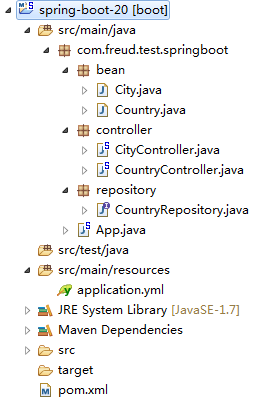
运行结果
第一次启动的时候会从
http://downloads.mongodb.org/win32/mongodb-win32-x86_64-2008plus-3.2.2.zip下载MongoDB的相关实例。
参考资料
Spring Boot Reference Guide : http://docs.spring.io/spring-boot/docs/current-SNAPSHOT/reference/htmlsingle/